Super Hearing: Spy Hearing App
- 4.7
- Rating
- 500.00K
- Installs
- Free
- Price

 Analysis by App-foxy
I approached Super Hearing: Spy Hearing App as a practical listening aid rather than a magic replacement for normal hearing. Its purpose is straightforward: use an Android phone to capture nearby sound and make it easier to hear through headphones or earbuds. That idea can be useful in quiet, controlled situations, but it also demands sensible expectations. In my experience, the app is most worthwhile when I treat it as a simple listening workflow, not as medical equipment or a covert listening tool.
The app sits in the Music & Audio category and comes from Wallet Passes Alliance. It is free to install, rated for Everyone, and has built a 4.7 average from around 10K ratings, with over 500K installs. Those figures suggest that the basic concept is easy for many people to understand, but popularity does not remove the need to test it carefully with your own phone, headphones, surroundings, and hearing needs.
How I use it from a reliable starting point
My first step is always to choose a calm environment. I place the phone near the sound I want to hear, connect headphones or earbuds, and begin with a low listening level. This baseline matters because amplification can make unwanted sounds more noticeable too: handling noise, clothing movement, fans, traffic, and the phone’s own microphone response can all become part of what I hear.
You May Also Like

 Blood Strike: 2.5 Anniversary
Blood Strike’s Loadouts Turn Every Drop Into a Tactical Gamble
A close look at Blood Strike’s custom loadouts: how fast access to signature weapons reshapes its battle royale rhythm, rewards preparation, and narrows the gap between fights.

 Pandora - Music & Podcasts
Pandora’s Music Is Easy to Start, but Harder to Recover
Pandora’s strength is its low-effort path from a seed to a station. Its weak spot is how much confidence it asks you to place in connection, setup, and quiet recovery.

 8 Ball Pool
 Is Built on Rivalries, Rematches, and Routine
A close look at the rivalries, rematches, shared routines, and unanswered safety questions that turn a quick pool match into a persistent mobile community.

 Samsung Music
’s Quiet Strength Is Playing What You Already Own
Its reach comes less from spectacle than from dependable access to a personal library. That simplicity is both the app’s strongest retention engine and its ceiling.

 AccuWeather: Weather Radar
AccuWeather Review: A Quick, Clear Forecast for Everyday Decisions
For everyday plans, the best forecast is the one you can understand quickly. AccuWeather makes rain timing, radar, and local conditions easy to act on, with a few trade-offs.

 Hill Climb Racing
Why Hill Climb Racing Still Turns Crashes Into One More Run
A tiny car, a bumpy hill and one more upgrade: Hill Climb Racing keeps resurfacing because its simple chaos makes every near-miss feel personal.
More From Our News Desk
View All News


A realistic example is a quiet conversation at home. If someone is speaking from a short distance away and I am struggling to follow every word, I can position the phone on a table between us and listen through earbuds. The arrangement works best when the phone remains still and the speaker is reasonably close. It is less useful if I keep the phone in my hand, because finger movement and bumps can compete with the voice.
I would not begin by placing the phone across a busy room and expecting a clean result. A phone microphone is designed for everyday mobile use, not for separating one voice from a crowd with professional precision. The closer and more stable the phone is to the intended sound, the more practical the experience becomes.
The free entry point is helpful for trying this workflow without committing money immediately. At the same time, the app includes in-app purchases ranging from $0.99 to $99.99 per item. I would spend time with the basic experience first and only consider an optional purchase if it clearly improves a task I perform regularly. Paying more cannot overcome a poor microphone position, unsuitable headphones, or a loud environment.
One habit made the biggest difference for me: I test the setup before an important conversation. I listen for a moment, ask myself whether speech is clearer or merely louder, and adjust the phone position before continuing. This quick check prevents the common mistake of assuming that maximum amplification is automatically the best setting.
Choosing the right everyday situation
This app makes the most sense for short, nearby listening tasks. A quiet conversation, a television at a modest distance, or a person speaking while I am seated nearby are situations where a phone-based amplifier may be convenient. It can also be useful when I want to experiment with whether bringing a microphone closer to a speaker helps me follow speech.
I would be more cautious in public spaces. Restaurants, family gatherings, public transport, and outdoor areas contain many competing sounds. Amplifying everything may make speech harder to understand, especially if the background is already louder than the person I want to hear. In those settings, moving closer, reducing background noise, or asking the speaker to face me may help more than turning up the app.
The app is not the right choice for emergencies, driving, professional monitoring, or situations where missing a sound could create danger. It should also not be treated as a hearing test, diagnosis, or substitute for advice from a qualified hearing professional. If hearing difficulty is persistent, sudden, painful, or affecting safety, a proper evaluation is a better next step.
Settings and preparation that deserve attention
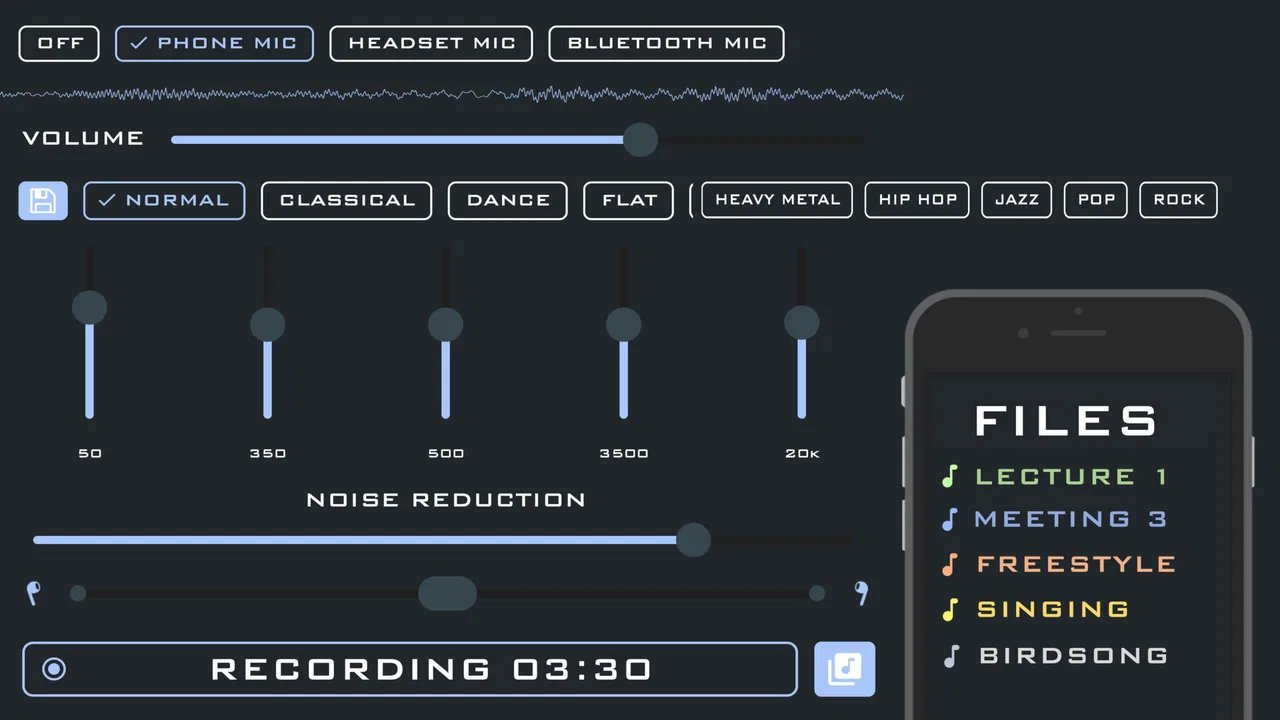
The most important controls are the ones that affect how much sound reaches my ears and how comfortably I can listen. I start with the phone’s own volume at a restrained level, then make small changes rather than jumping straight to the top. This is more comfortable and makes it easier to notice whether the app is genuinely helping speech clarity.
Headphone choice also changes the result. Earbuds can provide a direct, personal listening path, while larger headphones may feel more comfortable for a longer session. Neither automatically produces a better outcome. The useful choice is the one that fits securely, does not introduce distracting cable or handling noise, and lets me hear the amplified signal without discomfort.
I also check the physical placement of the phone before blaming the software. A microphone pointed toward the speaker and kept away from rubbing surfaces usually gives me a more usable starting point than a phone buried in a pocket or lying against a noisy table. This is a simple but often overlooked adjustment.
Another practical tip is to keep the listening environment predictable. Closing a door, switching off an unnecessary fan, or moving away from a running appliance can improve intelligibility more effectively than increasing amplification. The app cannot remove every competing sound just because it makes the overall signal louder.
Because this is an Android app with a minimum operating-system requirement of Android 5.0, compatibility is broad enough for many older devices as well as newer ones. Still, the age of a phone can affect the experience through microphone quality, headphone support, battery condition, and general responsiveness. I would judge the app on the complete setup rather than on the application alone.
Repeatable patterns for faster use
Experienced use is less about constantly experimenting and more about repeating a setup that already works. I keep one familiar pair of headphones available, choose a known quiet location, and position the phone consistently. That reduces the number of variables and makes it easier to tell whether a change actually improves listening.
For a conversation, I prefer a “phone first, volume second” routine. I place the phone near the speaker, listen briefly, and only then make a small volume adjustment. If I begin with loud output while the phone is poorly positioned, I may mistake harshness for clarity. Reversing the order gives me a cleaner baseline.
For television listening, I would avoid placing the phone directly against a speaker or television cabinet. A little distance can prevent vibrations and handling noise from dominating the signal. I also keep the phone stable and avoid touching it while listening. These are small details, but they matter because amplified imperfections become more obvious.
A useful social habit is to explain the setup to the person I am speaking with. Asking them to keep the phone in place and face me is more effective than secretly moving equipment around or repeatedly raising the volume. The app works best as a transparent aid for a specific listening situation, not as something I rely on without cooperation from the environment.
I would also end a session when listening becomes tiring. More sound is not always more useful, and prolonged loud listening can be uncomfortable. Shorter sessions with sensible volume are a better pattern than trying to force the app to compensate for a difficult acoustic environment.
Where the app reaches its limits
The central trade-off is simplicity versus control. A phone amplifier can be convenient because the hardware is already familiar, but it does not necessarily offer the specialized adjustment, fitting, or noise management associated with dedicated hearing devices. If I need consistent performance throughout the day, personalized support, or reliable speech separation, a purpose-built solution may be more appropriate.
There is also a delay and feedback risk in any microphone-and-headphone arrangement, depending on the device and listening setup. Even a small amount of lag can make a conversation feel unnatural, while sound leaking from headphones back toward the microphone can create an unpleasant loop. If that happens, lowering the volume, changing the headphones, or increasing the distance between microphone and earpieces may help, but the app cannot guarantee that every combination will behave perfectly.
Background noise is another hard boundary. In a quiet room, amplification can make a nearby voice easier to notice. In a crowded place, it may amplify the crowd as well. This is why I would choose environmental changes before software adjustments whenever possible. The best result often comes from reducing unwanted sound rather than increasing wanted sound.
The name and store summary may make the app sound suitable for “spy hearing,” but I would not use it to invade someone’s privacy. Responsible use means listening only where I have permission and where the situation is appropriate. The practical value is as a personal listening aid, not as a justification for secretly recording or monitoring people.
The purchase structure is worth considering too. Since the app is free but offers optional items from $0.99 to $99.99, I would be careful not to assume that every extra is necessary. A user who only needs occasional help may be perfectly satisfied without spending anything. Someone who wants a more regular workflow should first identify the exact limitation they are trying to solve before choosing an upgrade.
Who should try it, and who should choose something else
I think it is a reasonable app for an Android user who wants to test whether a phone-based amplifier helps in quiet, nearby situations. It is also suitable for someone who values a quick experiment, already owns comfortable headphones, and understands that microphone placement is part of the process. The Everyone content rating makes it broadly accessible from an age-classification standpoint.
I would skip it if I needed a discreet, all-day hearing solution, dependable performance in noisy public places, or professional-grade audio control. I would also skip relying on it if I cannot tolerate earbuds or headphones, since the listening setup is central to the concept. In those cases, a hearing professional, a dedicated assistive device, or a different audio accessory may be a better investment.
People comparing it with ordinary alternatives should separate convenience from capability. Simply increasing television volume is easier, but it raises the sound for everyone and may still leave speech unclear. Asking someone to speak closer or moving nearer costs nothing and can be more effective in a quiet conversation. Dedicated hearing products usually offer a more specialized experience, while this app’s advantage is that it lets me explore the phone-based approach with equipment I may already own.
My verdict after building a habit around it
Wallet Passes Alliance has made a focused Music & Audio app that is easy to understand: bring a phone microphone closer to a sound source and listen through headphones. Its strongest quality is accessibility. I can try the idea without paying for the download, and the workflow can be useful when the environment is quiet and the sound source is nearby.
The current version is 2.1.0, and my overall judgement is shaped less by a long feature list than by how responsibly the basic function is used. Stable phone placement, moderate volume, suitable headphones, and a low-noise room matter more than chasing maximum amplification. Those habits turn a basic concept into a more repeatable tool.
My honest recommendation is to treat it as a useful short-session experiment, not a replacement for hearing care or dedicated equipment. If your main problem is occasionally following a nearby voice in a quiet room, it is worth trying. If your needs involve persistent hearing loss, noisy environments, safety-critical sounds, or all-day reliability, I would look beyond this app before spending on optional purchases.
FAQs for Super Hearing: Spy Hearing App
01What is Super Hearing: Spy Hearing App, and how does it work?
Super Hearing: Spy Hearing App is designed to amplify nearby sounds through your smartphone’s microphone and play them back through headphones or earbuds. After granting microphone access, you can usually adjust the volume or amplification level to make surrounding speech and sounds easier to hear. It is intended for casual listening assistance, not as a professional hearing device or medical diagnostic tool.
02Does Super Hearing: Spy Hearing App really let me hear conversations from a distance?
The app can only amplify sound that reaches your phone’s microphone, so its performance depends heavily on the microphone, distance, background noise, and quality of your headphones. It cannot magically hear through walls or reliably capture distant conversations. Users should also respect privacy laws and obtain permission before recording or listening to private conversations, since unauthorized surveillance may be illegal.
03Is Super Hearing: Spy Hearing App free to download and use?
The app may be available as a free download, but some features can be restricted by advertisements, subscriptions, or in-app purchases. Before installing, check the current Google Play Store or Apple App Store listing for pricing, trial terms, renewal information, and supported devices. If a free trial is offered, read the cancellation conditions carefully to avoid unexpected charges.
04Does the app require headphones, and can it work on Android and iPhone?
Headphones or earbuds are generally recommended because they provide clearer amplified audio and help prevent microphone feedback or loudspeaker screeching. Compatibility depends on the specific Android or iOS version, device model, and app release. Wired headphones may offer lower delay than Bluetooth accessories, while Bluetooth audio can introduce a noticeable lag during live listening.
05Is Super Hearing: Spy Hearing App safe to use for hearing problems?
The app should not replace a hearing aid, audiologist, or medical examination. Excessive amplification may cause discomfort or potentially harm your hearing, especially when using earbuds at high volume. Start with the lowest comfortable setting, avoid prolonged use, and stop if you experience pain, ringing, dizziness, or worsening hearing. Consult a qualified professional if hearing difficulties continue.
Pros
- Simple interface makes the main listening modes easy to access.
- Useful for checking how clearly nearby sounds can be heard.
- Headphone support can improve detail and listening comfort.
- Quick to launch when you need temporary sound amplification.
- May help users notice quiet environmental sounds more easily.
Cons
- Results depend heavily on microphone and headphone quality.
- Background noise can make amplified audio tiring or unclear.
- Not a substitute for professional hearing tests or medical advice.
- Continuous microphone access may raise privacy concerns for some users.
- Battery use can increase during extended listening sessions.

Super Hearing: Spy Hearing App
Gallery